
What’s Included
What is included in this service?
Agent Directory Pro includes:
– A “remodel” of your Facebook business page (If you don’t have one, we’ll create one for you!)
– Access to our Agent Referrals Facebook group
– Free access to our Facebook Marketing webinars
– Discounts on all HomeASAP products and services
Click here for a full list of the benefits of your Agent Directory Pro membership:
http://go.homeasap.com/directorypro
Will I get leads from this service?
The annual charge of $97.49 covers creating/remodeling your Facebook business page along with the services mentioned above. Your Create/Remodel will not guarantee leads but will ensure your business page is professional and marketable.
The additional services offer tools and resources to help you learn how to successfully market yourself and your Facebook Business Page. The most successful way to bring in leads is through Facebook advertising.
If you are looking for a lead generation solution for your Facebook page, consulting, advertising or marketing support, we offer a service called TurnKey Suite. With this service, you receive ongoing updates to your Facebook business page, an Account Manager/marketing expert who will launch Facebook advertising campaigns on your behalf, up to one hour of phone support per month, lead gen real estate apps, lead notifications, and more. You can learn about that service here: https://turnkeysuite.homeasap.com/
Please let your designer know if you would like to be put in touch with one of one sales representatives, who can discuss the service with you in detail. They can be reached from Monday to Friday, 9:00-5:30 EST at [email protected] or (904) 549-7616.
What is done to my page for the Facebook Business Page Remodel/Create?
If you’re getting a Facebook Business Page Remodel (because you have an existing page):
A designer:
- Adds page tabs that connect to any Real Estate Agent Directory services you purchase (ex: Agent Profile, IDX Home Search, Featured Listings, Dream Sweeps)
- Designs 2 to 3 custom cover photos
- Finds/uploads 6-10 regional stock cover photos
- Uploads intro custom content posts
- Adds any additional information or logos to your page that you sent us
- Ensures your page biography is completely filled out and optimized with keywords and tags for SEO (search engine optimization)
- Proofreads your page
- If you are part of the Real Estate Agent Directory on Facebook, you will also receive an external webpage with your Agent Profile
If you’re getting a Facebook Business Page Create (you are having a new page created):
A designer:
- Creates the page
- Inputs the information you provided on your Create Form
- Adds page tabs that connect to any Real Estate Agent Directory services you purchase (ex: Agent Profile, IDX Home Search, Featured Listings, Dream Sweeps)
- Designs 2 to 3 custom cover photos
- Finds/uploads 6-10 regional stock cover photo
- Uploads intro custom content posts
- Adds any additional information or logos to your page that you sent us
- Ensures your page biography is fully filled out and optimized with keywords and tags for SEO (search engine optimization)
- Proofreads your page
- If you are part of the Real Estate Agent Directory on Facebook, you will also receive an external webpage with your Agent Profile
What’s the difference between a Facebook Business Page and a Personal Page?
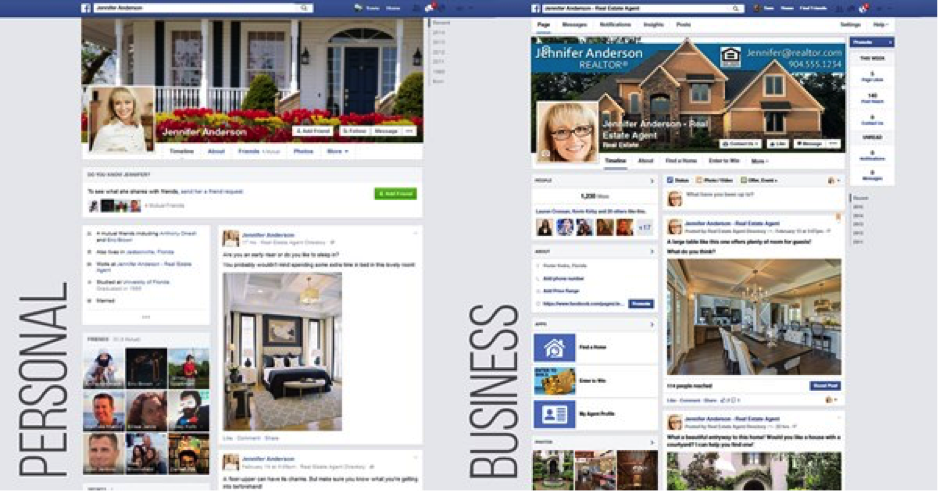
Put simply, a personal Facebook page is for personal use. A Facebook business page is for business/commercial use and can be viewed publicly like a website. In order to have a Facebook business page, Facebook requires you to have a personal account for permissions purposes. However, the two page types are kept completely separate.
With a Facebook personal page, a user must request to become friends with another user (and then accept the friend request) before they receive content from each other in their news feeds. This can be very limiting in terms of building your business. Most people do not want to become friends with people they don’t know well. If you do become friends, users may choose to hide their personal information from you. Most Facebook friends do not want to be “spammed” about your business from your personal profile. Additionally, it is against Facebook’s Terms of Service to utilize your personal profile for business purposes and they can shut down your account.
By contrast, Facebook business pages allow your personal friends, extended connections, local users, and anyone else on Facebook to “like” (become a fan/follower) of your page. Asking someone to become a fan is non-invasive, as it doesn’t allow you to access the fan’s personal posts.
It is much easier to gain new fans than new Facebook friends. Once someone becomes a fan, they have opted themselves in to receive your content. In other words, fans want to see your real estate posts! It’s like your own drip email marketing campaign on social media. Use your business page to market your real estate services, build your brand, and grow your audience.
A Facebook business page is beneficial in comparison to a personal page because of its unique features:
- Ability to host lead gen apps like Home Search, Featured Listings and Contests
- No “friend” limits (5,000 for personal pages)
- Access to advertising, in-depth targeting, and promoted posts
- Native Facebook scheduling
- Facebook insights to view your page’s activity and audience info
- Allow admins to co-manage your page, make updates and advertise for you
What is SEO and how will it benefit me?
Search engine optimization has to do with the online visibility of your page in a web search engine. The creation/remodel of your page involves behind-the-scenes procedures aimed at increasing your SEO score: adjusting your settings to include keywords, tagging your page in accordance to what search engines are looking for, and ensuring the categories are filled entirely/properly. Facebook and Google work hand-in-hand, so while we tag, add keywords, image pixels, and content to your page, it increases your overall SEO score across both platforms.
Getting Started
How do I fill out the Create/Remodel Form? Where do I find the Create/Remodel Form?
We send out the form through email to allow you to easily communicate with your designer and ask questions if needed. The sender email address is [email protected]. The best way to get your form to us is to click “Forward” on the email we sent with the form, fill out your answers next to the fields, and hit send. Alternately, you can also copy and paste the form into a response with your answers. As long as we get the necessary information back in an email reply, either method will work. Feel free to include any questions or additional information you have and your designer will get back to you ASAP.
Please note: We need this form returned to us in order to create or remodel your page.
If the information on my Facebook Business page is current, do I need to fill out the form?
Feel free to skip over fields on the form if your information is already current, and we will use what is already on the page. We ask for your contact information to ensure that everything is up to date. If you are struggling to come up with a description, don’t worry! We will come up with one for you.
If anything is left blank on the Cover Photo Design section of the form, your design style will be left up to the expertise of your designer. Our designers are pros at researching you and your brokerage to ensure your design is personalized to you.
How do I give Admin? (for Remodels)
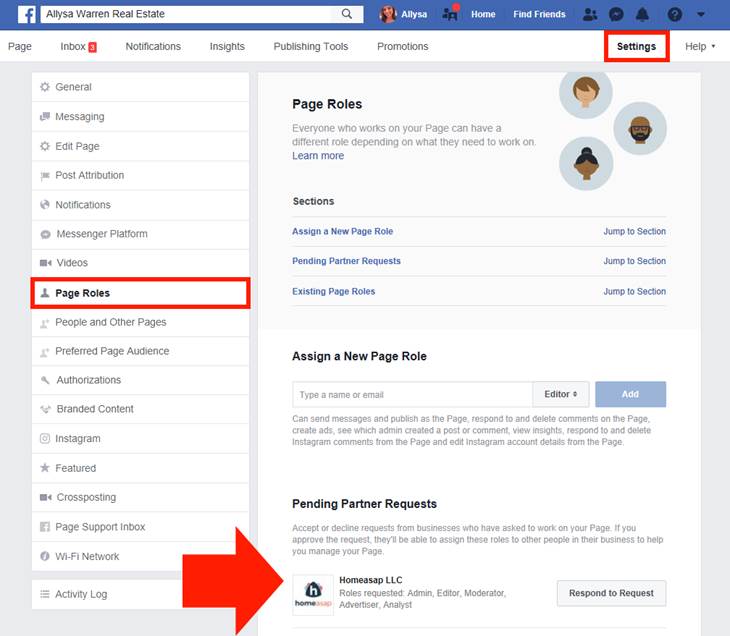
If you have an existing Business Page you’d like remodeled, you will need to include the URL in the form when you email it back to us. After your designer receives this, they will send an Admin invitation from our Homeasap LLC Business Manager. You will receive a Facebook notification that will allow you to quickly accept the invitation. The designer will also email you to let you know that they’ve sent the request, give you instructions to accept and answer any questions you may have.
If for some reason you aren’t seeing the notification, you can locate the Admin request by going to your Page’s Settings, then clicking the Page Roles tab on the left. From there, you can click “Respond to Request” to accept.
Will I get a phone call before my page is created/remodeled?
Your main point of communication with your page designer is through email, for accuracy of information and documentation purposes. Once you respond to our email with the form and admin instructions, your response will be delivered to your assigned designer. The quickest and most direct way to get answers to your questions about your page create/remodel is to email your designer. If you feel you could better communicate your questions over the phone, let your designer know and they can schedule a call with a member of our Design Customer Support team, depending on availability.
Turnaround Time / Revision Requests
How long does it take to complete the business page?
Our team will have your page completed within 3-7 business days. If you need it sooner, please contact us about expedited options.
Do you offer revisions?
We offer 2 cover photo revisions after your remodel/create is complete to ensure you are satisfied with your cover photo designs. Just reach out to your designer and let them know what you’d like changed.
What is your cancellation and refund policy?
As this service includes the cost of a graphic designer performing work on your page, once your page has been created or remodeled, we will be unable to issue a refund. We will make every effort to ensure your Facebook business page create or remodel is to your satisfaction; therefore, 2 revisions to your page are allotted prior to your next renewal. We are able to cancel your Directory Pro subscription so that you will not incur any recurring charges upon your next renewal date.
100% Money Back Guarantee
We’re confident you’ll love Directory Pro which is why we offer a no questions asked money back guarantee. Just let us know if it’s not for you and we’ll refund your payment promptly.

Phone: 904-549-7616
Email: [email protected]
Available Monday-Friday 9AM-5PM EST
4887 Belfort Road, Suite #400
Jacksonville, Florida 32256
Have questions or just want to talk to us?
Sales: (904) 549-7616 | [email protected]
Customer Support: (904) 549-7600 | [email protected]